CanItBuy Agent Ready for WooCommerce
A free plugin that shows which AI agents visit your store, how far they get in the cart and checkout, where they stop and why, and what in your product data stops them from buying.
Install from WordPress.org
Version 1.3.0, 20 October 2026 · WordPress 6.5+, WooCommerce 8.5+, PHP 7.4+ · English and Polish · GPL licence
The plugin is in the WordPress.org directory, so updates reach your WordPress on their own. The ZIP file on this page also includes Polish.
Download the ZIP file (90 KB) · SHA-256 checksum of the file
What it does
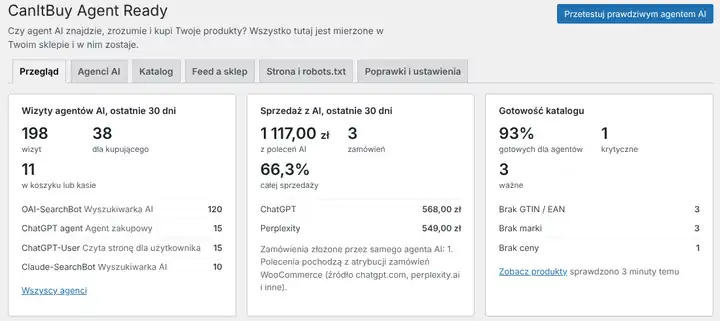
- AI agent visits. Counts agents and crawlers that identify themselves: ChatGPT agent (signed requests), ChatGPT-User, OAI-SearchBot, Claude, Perplexity and more. You see who reads product pages and who reaches the cart and checkout.
- Signed agents, confirmed. ChatGPT agent and other agents sign their requests with a cryptographic key (Web Bot Auth). With the check on, the plugin confirms the signature and shows "Signature confirmed" visits apart from visitors that only use an agent's name.
- Agent journeys. Follows declared shopping agents, such as ChatGPT agent, from the first product in the cart to the order: how far each one got, what was in its cart, where it stopped and the last message your store showed it. You see the value left in carts and the store messages that stop agents most often.
- Rules for AI agents. You decide what agents may do: stop visitors with a wrong agent signature, let only agents with a confirmed signature check out, or let agents fill the cart and leave the order to the person. Off by default; nothing changes for people.
- Compared with other stores. Join the store network and see how your store compares with other WooCommerce stores: agent visits, checkouts reached, the share of orders from AI, catalog readiness and what stops agents most often. Off by default; before you join you see exactly what the plugin will send. The combined numbers are public on the AI agent pulse page.
- Sales from AI. Sums the orders AI assistants sent you (chatgpt.com, perplexity.ai, claude.ai, gemini.google.com and others) from WooCommerce order attribution, and marks orders placed by an agent itself.
- Catalog audit. Checks every product and variation: price, variations with an "Any" value, EAN with check digit, image, description, SKU, brand and category. Each issue says what it costs you and how to fix it. CSV export for Excel.
- Feed vs store. Compares your Google Merchant Center or Ceneo feed with the store: price, availability, EAN and currency, and lists products in stock that the feed leaves out.
- Page and robots.txt. Shows which AI bots robots.txt lets in, and checks that the product data on the page (JSON-LD) matches WooCommerce. Catches stale caches and a second, different price from an SEO plugin.
- Fixes, off by default. EAN and brand in product data, return window and delivery in every offer, and letting AI assistants read products when robots.txt keeps them out. Your other rules stay.
Your data stays in your store
- Until you join the store network, the plugin sends nothing to CanItBuy or anyone else.
- If you join, it sends last week's totals once a week with a random id instead of your store address: no visitor or customer data, product names, prices, order amounts or message text. Leaving the network deletes everything your store sent.
- If you turn on the signature check, your server downloads the public key of an agent that signed its request, at most once a day per agent. No store data is sent. Off by default.
- It counts only agents and crawlers that identify themselves, per day, without IP addresses or visitor ids. Ordinary customers are never recorded.
- For shopping agents it keeps a short journey: the agent, the time, the stage (cart, checkout, order), the cart value, the last page and the store's message, with e-mail addresses and long numbers masked. No IP addresses, no customer data, no cookies of its own. Journeys are deleted after 180 days.
- Page, robots.txt and feed checks are requests from your server to your store or to the feed address you enter, only when you click.
- Deleting the plugin removes its tables and settings.
Install
- In WordPress go to Plugins > Add New, search for "CanItBuy Agent Ready" and click Install Now.
- Or download the ZIP file from this page and choose it under Plugins > Add New > Upload Plugin.
- Activate it and open WooCommerce > CanItBuy.
- Click "Check the catalog", then check your pages and feed. Turn fixes on under "Fixes and settings".
What it will not do
- It cannot recognise agents that run in a normal browser and do not identify themselves, such as Claude in Chrome or Comet. They look like people.
- It cannot count pages served from a cache without WordPress. Cart and checkout are usually not cached, so buying attempts are counted.
- It cannot see what a firewall or CDN (for example Cloudflare) does to real agents. A test on canitbuy.com shows that.
- Visits are declared: anyone can pretend to be another bot. The exception is visits whose signature the plugin confirmed.
Watch a real agent shop in your store
The plugin measures your store from the inside. A test on canitbuy.com sends a real AI agent through your purchase path, records it, and stops before payment.