In this article
The short answer
- 66 everyday requests, 22 stores: 10 in Poland, 12 in the UK and the US. The agent had to pick a product using only the store’s own pages and quote them.
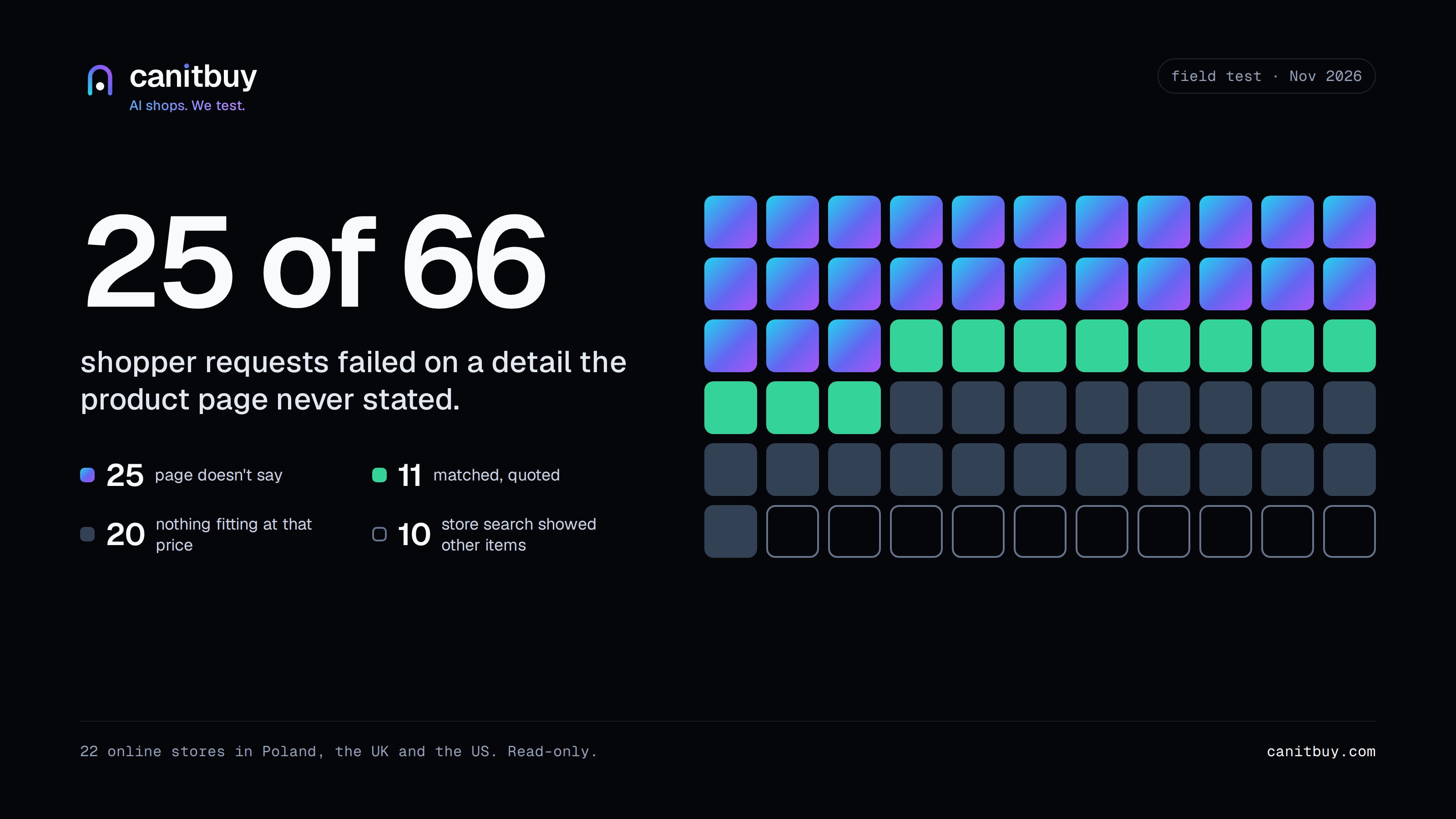
- 11 requests matched. In 25 the product probably fit, but the page never stated what the shopper asked. In 30 the store had nothing that fit, or its own search showed other things.
- The gaps were ordinary: no water rating on earbuds, no plug type on a charger, no warranty on a home battery, a price only visible after logging in.
- Poland and the UK/US came out almost the same: about one request in three failed on missing information, not on price.
The question
Ask a shop assistant whether a dog harness is adjustable and you get an answer in two seconds. Ask an AI shopping assistant and it can only read what the store wrote down. If the page doesn’t say, the assistant either guesses or moves on to a store that does say.
We wanted to know how often that happens in real shops, not in our own test stores. So for two days we sent our agent shopping.
How the test worked
- We wrote 66 requests the way people actually ask: “Front bike light, at least 1000 lumens, USB-C rechargeable, waterproof, under £60.” The requirements were set before we looked at any product page.
- The agent used each store’s own search, opened up to five products and read the whole page: title, price, description, specification table and category.
- Every requirement got one of three answers: yes, no, or not stated. A yes or a no had to come with a quote copied from the page, and our code checked that the quote is really there.
- For every “not stated” we also ran a Ctrl+F check: the words a shopper would search for, such as “warranty” or “IP65”, must be absent from the page.
- For each product the agent picked, we saved a screenshot with the date and time on it and a copy of the page.
The test only read public pages. Our bot identifies itself, obeys robots.txt and never touches a cart, an account or a form. One store tells bots not to use its search, so we left it out.
What came back
- 11 matched. The agent found a product and could quote the page for every single requirement.
- 25 hit a gap. A product that probably fits, but the page never states something the shopper asked about.
- 20 had nothing fitting. The store simply didn’t sell it at that price or spec. That’s an honest no.
- 10 got lost in the store’s own search. The right product may exist, but searching for it brought up something else.
The split was close in both markets: 13 gaps in 30 Polish requests, 12 in 36 UK and US requests.
The quiet pages
None of the missing details were exotic. They were the things people ask about first:
- A dog harness with no word on whether it adjusts or has reflective strips.
- A cat scratching post with no height and no material.
- Wireless earbuds with no water rating.
- A USB-C charger that doesn’t say which plug it has, or which phones it suits.
- A motorcycle phone mount that doesn’t say if it is waterproof or which phones fit.
- A helmet light with no weight. The page does mention CR2032 batteries, so it isn’t rechargeable, but you have to know what that means.
- A home battery at around €3,500 with no warranty mentioned anywhere.
- A solar inverter that doesn’t say which batteries it works with.
- A soundbar page that never mentions Dolby Atmos.
- Prices that only appear after you log in. An agent can’t compare a price it can’t see.
A human shopper might write to the shop, look at the photos or just take a chance. An assistant picking for someone else tends to do the safe thing: choose the product whose page answers the question.
Two things we didn’t expect
Store search is a bigger problem than we thought. In 10 requests the store’s own search sent the agent somewhere else. Searching “dog bed” brought up flea treatments. Searching “solar panel” in a solar shop brought up mounting frames and screws. If the search box can’t find it, an agent that uses the search box can’t buy it.
An honest “no” is useful too. One shop selling LED car bulbs explains on every page that there are no rules approving them for road use yet. The agent read that, said no to a road-legal set and moved on in seconds. A clear no saves everyone time. Silence doesn’t.
What we got wrong on the way
Our first version read only the first few thousand characters of each page and missed specification tables, so about half of its “not stated” answers were our fault. Later it couldn’t read the pound sign when a page wrote it as £. We fixed both and ran everything again. The agent is still a little too literal at times: it didn’t accept “fitted furniture” as an answer to “under kitchen cabinets”.
If you run an online store
Most of this costs an afternoon, not a project:
- Write down the answers to the first questions people ask. Size, fit and compatibility, material, water rating, plug, what’s in the box, warranty.
- Put them in text, not only in photos or a PDF. An assistant reads words.
- Show the price without a login, or at least say why it is hidden.
- Search your own store with your customers’ words. If “dog bed” finds flea drops, fix the search before anything else.
- Say what the product is not. “Not road legal” or “not for iPhone 15 Pro Max” is an answer an assistant can use.
Want to see what an AI agent can and can’t confirm on your own pages? See how we test stores.
Questions
Which AI agent did you use?
Our own test agent, built on a current large language model, with one strict rule: anything it claims must be quoted from the store’s page. It is not ChatGPT or another public assistant, but it reads pages the way they do: as text.
Why don’t you name the stores?
Because the point isn’t one store. The same gaps showed up in every market and category we tried. Shops that want their own results can ask us.
Did the agent buy anything?
No. It only read public pages and the stores’ own search. It never opened a cart, an account or a form.
Isn’t “not stated” sometimes the agent’s fault?
Sometimes, and we checked. Every “not stated” comes with the words a shopper would search for, and we confirmed those words are not on the page. Where a word did appear, we looked by hand; it was almost always in a menu or next to another product.